Splyt On-Demand Widget - WebHook Integration Service
Contents
1. Introduction
As part of integrating the Splyt On-Demand Widget, you will need to implement a small number of webhook handlers to ensure the proper operation of the Splyt On-Demand Widget.
We will need to contact your Webhook Integration to authenticate users, handle payments, notify you of booking receipts, among other operations.
2. Auth
It is expected that all endpoints in your API are behind an authorization mechanism. In particular, Widget implements a JSON Web Token.
As such, Widget will send, with the exception of the Login endpoint, an 'Authorization': ${ AUTHORIZATION_HEADER_PAYLOAD } header with every request it makes to your API.
You should always, prior to handling any request, validate that the ${ AUTHORIZATION_HEADER_PAYLOAD } is valid and correctly identifies a known user with access to Splyt's Roaming Services.
Every request will, consequently, be on behalf of the particular user to whom the token relates to, and all response payload will be assumed to be particular to said user.
We recommend you use single-use tokens (i.e. expiry should be set to a small period of time), with small time-to-live lifecycles.
Tokens will be cached on Widget (so that they can be re-used) until they are no longer valid.
Note that Widget will work under the assumption that tokens are signed specifically for a particular user_id, granting permission for recurrent requests to your API.

3. Endpoints
3.1. Login
While initially loading, Widget will make a POST /v1/login request to authenticate the user for a short while.
You should ensure that the provided user_id corresponds to a known user and that the provided token is valid and relates to this same user_id.
If successful, you should then return an authorization_header that contains credentials to identify the user in subsequent requests.
These credentials should both allow Widget to make requests to all following endpoints and provide a user context for your endpoint.
(i.e., unless otherwise specified, Widget will not explicitly provide any user identification parameters and will expect that you can imply this information from the credentials in the AUTHORIZATION header value)
We may also trigger this endpoint in the following scenarios:
- the user exits and reopens Widget;
- any of the cached tokens associated with the user expire;
- the user uses Widget without exiting for longer than the login cache time.
This endpoint fills the role of "Your Webhook Service" in this diagram.
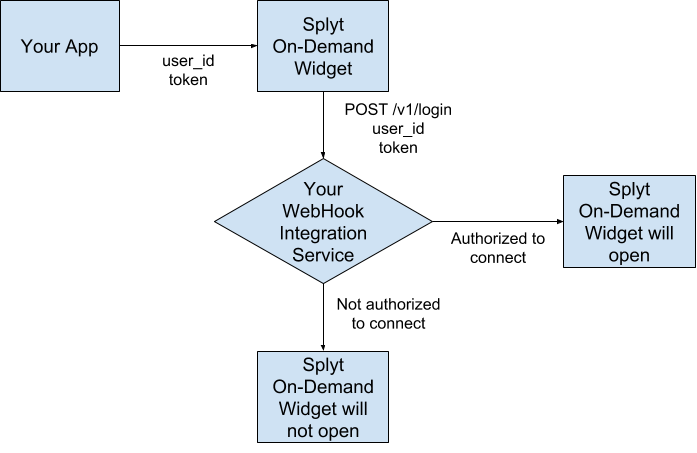
Example request payload:
{
  "token": "super-secret-short-lived-token",
  "user_id": "12345"
}
Where:
| Key | Type | Description |
|---|---|---|
| token | string | An API access token, signed for the user_id, given by your application to Widget, via Widget SDK integration. |
| user_id | string | An identifier of the user, given by your application to Widget, via Widget SDK integration. |
Example successful response:
{
  "authorization_header": "Bearer secret-long-lived-token",
  "user_id": "12345"
}
Where:
| Key | Type | Required | Description |
|---|---|---|---|
| authorization_header | string | Yes | A string that will be later used verbatim as the value for the Authorization Header field or authenticated requests. |
| user_id | string | Yes | The identifier of the user. |
Response Codes:
| StatusCode | Meaning | Widget Behaviour |
|---|---|---|
| 2XX | User is successfully authorised | Widget will load normally. |
| 4XX | User is not authorised | Widget will request user log in. |
| 5XX | Something went wrong | Widget will exit. |
3.2. Retrieve User Details
When you receive a call to GET /v1/users/:user_id, you should return specific personal details of the user identified by the given user_id.
A request to this endpoint will primarily happen during Widget startup, to retrieve the user's most up to date information, but may also happen anywhere in the application flow.

Example successful response:
{
  "currency_code": "GBP",
  "email": "test@email.com",
  "first_name": "John",
  "last_name": "John",
  "phone_number": "+441234567890",
  "user_id": "abc123"
}
Where:
| Key | Type | Required | Description |
|---|---|---|---|
| currency_code | string | Yes | The ISO-4217 code of the main currency associated with the user. |
| string | No | The user's email address, so we can forward receipt related information. | |
| first_name | string | Yes | The user's given name, to share with the driver. |
| last_name | string | No | The user's last / family name, to share with the driver. |
| phone_number | string | No | International phone number of the passenger. Used by driver to contact the passenger. Must be E.164 international format, including the prefixing +. |
| user_id | string | Yes | The identifier of the user, as given by user_id. |
Response Codes:
| StatusCode | Meaning | Widget Behaviour |
|---|---|---|
| 2XX | Successful request | User details will be used for Widget functionality, where needed. |
| 4XX | Invalid request | Widget will display an error message and request a user log in. |
| 5XX | Something went wrong | Widget will display an error message and shutdown. |
3.3. Block User
When you receive a call to POST /v1/users/block/:user_id, you should update your system to mark the user identified by the given user_id as blocked.
A request to this endpoint may happen at any moment, originating from Customer Support Services. We are notifying you that this user has been blocked in our system. This user will be unable to launch widget. If you have questions on why this has occurred, please contact our Customer Support team.
Example successful response:
{
  "reason": "CREDIT_CARD_FRAUD"
}
Where:
| Key | Type | Required | Description |
|---|---|---|---|
| reason | string | Yes | The reason why the user has been blocked. Currently, only ["CREDIT_CARD_FRAUD", "MISS_USE_OF_SERVICE", "TOO_MANY_CANCELLATIONS"] are supported values. |
Response Codes:
| StatusCode | Meaning | Widget Behaviour |
|---|---|---|
| 204 | Successful request | User has been blocked successfully. Splyt Widget expects no payload to be returned. |
| 4XX | Invalid request | TBC |
| 5XX | Something went wrong | TBC |
3.4. Unblock User
When you receive a call to POST /v1/users/unblock/:user_id, you should update your system to clear the blocked status from the user identified by the given user_id.
A request to this endpoint may happen at any moment, originating from Customer Support Services. We've unblocked this user in our system, they will now be able to access Widget again.
Response Codes:
| StatusCode | Meaning | Widget Behaviour |
|---|---|---|
| 204 | Successful request | User has been unblocked successfully. Splyt Widget expects no payload to be returned. |
| 4XX | Invalid request | TBC |
| 5XX | Something went wrong | TBC |
3.5. List User Payment Methods
When you receive a call to GET /v1/payment-methods, you should return a list of the payment methods associated with the user.
A request to this endpoint may happen anywhere in the application flow.

Example successful response:
{
  "cards": [
    {
      "brand": "mastercard",
      "expiry_month": "04",
      "expiry_year": "34",
      "last_four_digits": "1234",
      "payment_method_id": "def456"
    },
    {
      "brand": "visa",
      "expiry_month": "12",
      "expiry_year": "43",
      "last_four_digits": "6789",
      "payment_method_id": "ghi789"
    }
  ],
  "wallets": [
    {
      "name": "Wallet A",
      "payment_method_id": "iii888"
    },
    {
      "name": "Wallet B",
      "payment_method_id": "jjj999"
    }
  ]
}
Where:
| Key | Type | Required | Description |
|---|---|---|---|
| cards | array | Yes | List of Debit/Credit Card like Payment Methods. |
| cards[].brand | string | Yes | The type/brand of the debit/credit card payment method. Currently, only ["mastercard", "visa"] are supported values. |
| cards[].expiry_month | string | Yes | A two-digit representation of the month when the debit/credit card payment method is set to expire. Must be a string representation of the numbers between 00 and 12. |
| cards[].expiry_year | string | Yes | A two-digit representation of the year when the debit/credit card payment method is set to expire. Must be a string representation of the numbers between 00 and 99. |
| cards[].last_four_digits | string | Yes | Last four of the (typically) sixteen digit debit/credit card number associated with the payment method. Must be a string representation of the numbers between 0000 and 9999. |
| cards[].payment_method_id | string | Yes | The identifier for the payment method selected by the user for the booking |
| wallets | array | Yes | List of Virtual Wallet like Payment Methods. |
| wallets[].name | string | Yes | A human readable identifier of the wallet. |
| wallets[].payment_method_id | string | Yes | The unique identifier for the payment method. |
Response Codes:
| StatusCode | Meaning | Widget Behaviour |
|---|---|---|
| 2XX | Successful request | The list of payment methods will be used for Widget functionality, where needed. |
| 4XX | Invalid request | No payment methods will be displayed, and a user will not be able to book. |
| 5XX | Something went wrong | No payment methods will be displayed, and a user will not be able to book. |
3.6. Retrieve payment method token
If the payment provider requires a unique token for the payment, the Splyt will make a GET /v1/payment-methods/token/:payment_method_id request to retrieve that token for the given payment method ID.
Example successful response:
{
  "token": "abc123"
}| Key | Type | Required | Description |
|---|---|---|---|
| token | string | yes | The token used to authorise payments for the given payment method ID |
Response Codes:
| StatusCode | Meaning | Widget Behaviour |
|---|---|---|
| 2XX | Successful request | TBC |
| 4XX | Invalid request | TBC |
| 5XX | Token generation failed | TBC |
3.7. Retrieve Payment Method Details
When you receive a call to GET /v1/payment-methods/:payment_method_id, you should return more details about the payment method identified by the given payment_method_id.
A request to this endpoint may happen anywhere in the application flow.

Example successful response (debit/credit card like payment method):
{
  "brand": "visa",
  "currency_code": "GBP",
  "description": "this is an example payment method",
  "expiry_month": "09",
  "expiry_year": "21",
  "last_four_digits": "9998",
  "payment_method_id": "jkl000",
  "payment_method_type": "card"
}
Example successful response (wallet like payment method):
{
  "balance": 900,
  "currency_code": "SGD",
  "description": "this is an example payment method",
  "name": "Wallet X",
  "payment_method_id": "mno321",
  "payment_method_type": "wallet"
}
Where:
| Key | Type | Required | Description |
|---|---|---|---|
| balance | integer | Yes only when payment_method_type: "wallet". Optional otherwise. The current usable balance for this payment method. This property uses "minor units", so in the above examples, the value would be £4.56 and $9, respectively. |
|
| brand | string | Yes only when payment_method_type: "card". Should not be present otherwise. |
The type/brand of the debit/credit card payment method. Currently, only ["mastercard", "visa"] are supported values. |
| currency_code | string | Yes | The ISO-4217 code for the currency associated with the payment method. |
| description | string | No | A textual description of the payment method. |
| expiry_month | string | Yes only when payment_method_type: "card". Should not be present otherwise. |
A two-digit representation of the month when the debit/credit card payment method is set to expire. Must be a string representation of the numbers between 00 and 12. |
| expiry_year | string | Yes only when payment_method_type: "card". Should not be present otherwise. |
A two-digit representation of the year when the debit/credit card payment method is set to expire. Must be a string representation of the numbers between 00 and 99. |
| last_four_digits | string | Yes only when payment_method_type: "card". Should not be present otherwise. |
Last four of the (typically) sixteen digit debit/credit card number associated with the payment method. Must be a string representation of the numbers between 0000 and 9999. |
| name | string | Yes only when payment_method_type: "wallet". Should not be present otherwise. |
A human readable identifier of the wallet. |
| payment_method_id | string | Yes | The identifier for the payment method as given by payment_method_id
|
| payment_method_type | string | Yes | An identifier of the type of payment method. Currently supported values are ["card", "wallet"]. |
Response Codes:
| StatusCode | Meaning | Widget Behaviour |
|---|---|---|
| 2XX | Successful request | Payment methods details will be used for Widget functionality, where needed. |
| 4XX | Invalid request | TBC |
| 5XX | Something went wrong | TBC |
3.8. Pre-Authorize Payment
When creating a booking, Widget attempts to secure payment for it, by pre-authorizing an estimated amount against a payment method of the user.
Widget will make a POST /v1/payments/pre-auth request to retrieve this information.
You should validate that the user and payment method combination can be allowed to make a booking using Splyt's Roaming Services.
You also need to ensure the user has sufficient available funds on that payment method and reserve the given amount so that it cannot be spent until Widget releases/captures the final amount.
If a user has any pending or failed charges on a payment method, that, when resolved, would leave insufficient funds for the successful charge of the given amount, you may wish to fail the verification for that payment method.
Response to this request should be as immediate as possible, even if you cannot finalize processing the transaction immediately (i.e., responding with status: "pending").
Refer to transaction details for more information.
Widget keeps track of generated transactions in an accounting ledger-like fashion. We strongly recommend the same approach.
We suggest that, as part of the response to both this endpoint and the Charge User, you return a new and unique partner_transaction_id for each successful request.
This partner_transaction_id will be stored on Widget side and, together with a matching splyt_transaction_id, will be used as a means of identification of a particular transaction.
Both properties will also be used, at a later date, to match up against our finance processes.
Pre-authorized transactions should be kept on hold for a minimum of 7 days or until they are explicitly resolved with a request to either the Cancel Pre-Authorized Payment or Capture Pre-Authorized Payment endpoints.

Example payload:
{
  "amount": 123,
  "currency_code": "GBP",
  "payment_method_id": "jkl000",
  "splyt_booking_id": "stu987",
  "splyt_transaction_id": "pqr654"
}
Where:
| Key | Type | Description |
|---|---|---|
| amount | integer | The amount that should be held from the user's available funds on the payment method. This property uses "minor units", so in the above example, the estimated value is £1.23. |
| currency_code | string | The ISO-4217 code for the currency associated with the transaction. |
| payment_method_id | string | The identifier of the payment method, as given by payment_method_id. |
| splyt_booking_id | string | The identifier of a booking, generated on Splyt's side. This property can be used as a simple way of grouping a set of relevant transactions. |
| splyt_transaction_id | string | The identifier of the transaction record, generated on Splyt's side. |
Example successful response:
{
  "partner_transaction_id": "vwx111",
  "payment_method_id": "jkl000",
  "reason": "insufficient_balance",
  "status": "failed",
  "user_id": "abc123"
}
Where:
| Key | Type | Required | Description |
|---|---|---|---|
| partner_transaction_id | string | Yes | The identifier of the transaction, generated on the partner side. |
| payment_method_id | string | Yes | The identifier of the payment method, as given by payment_method_id. |
| reason | string | Yes when status: "failed". Optional otherwise. |
Reason why a transaction is in a particular status. Refer to the Reason Codes table for currently supported values. |
| status | string | Yes | Current status of the transaction. Currently, only ["success", "failed", "processing"] are supported values. |
| user_id | string | Yes | The identifier of the user, as given by user_id. |
Response Codes:
| StatusCode | Meaning | Widget Behaviour |
|---|---|---|
| 2XX | Successful request | For status: "failed", Widget will display an error message and the booking creation process will be halted. Otherwise, Widget will continue the booking creation process. |
| 4XX | Invalid request | Widget will display an error message and the booking process will be halted immediately. |
| 5XX | Something went wrong | Widget will display an error message and the booking process will be halted immediately. |
3.9. Cancel Pre-Authorized Payment
A booking may be terminated with a final receipt with an amount of 0 (for example, if a user changed their plans and cancelled the booking, depending on the Provider's cancellation policy).
In such scenarios, Widget will make a POST /v1/payments/pre-auth/cancel request to trigger a release of the amount held against the user's payment method.
You should ensure that whatever amount was previously held, is made available to the user again, so that it can be used for other purchases.

Example payload:
{
  "partner_transaction_id": "vwx111",
  "payment_method_id": "jkl000",
  "splyt_booking_id": "stu987",
  "splyt_transaction_id": "pqr654"
}
Where:
| Key | Type | Description |
|---|---|---|
| partner_transaction_id | string | The identifier of the transaction record, returned from the Pre-Authorize Payment endpoint. |
| payment_method_id | string | The identifier of the payment method, as given by payment_method_id. |
| splyt_booking_id | string | The identifier of a booking, generated on Splyt's side. This property can be used as a simple way of grouping a set of relevant transactions. |
| splyt_transaction_id | string | The identifier of the transaction record, generated on Splyt's side. |
Example successful response:
{
  "partner_transaction_id": "vwx111",
  "payment_method_id": "jkl000",
  "reason": "insufficient_balance",
  "status": "failed",
  "user_id": "abc123"
}
Where:
| Key | Type | Required | Description |
|---|---|---|---|
| partner_transaction_id | string | Yes | The identifier of the transaction, generated on the partner side. |
| payment_method_id | string | Yes | The identifier of the payment method, as given by payment_method_id. |
| reason | string | Yes when status: "failed". Optional otherwise. |
Reason why a transaction is in a particular status. Refer to the Reason Codes table for currently supported values. |
| status | string | Yes | Current status of the transaction. Currently, only ["success", "failed", "processing"] are supported values. |
| user_id | string | Yes | The identifier of the user, as given by user_id. |
Response Codes:
| StatusCode | Meaning | Widget Behaviour |
|---|---|---|
| 2XX | Successful request | For status: "failed", TBC. Otherwise, Widget will continue it's normal behaviour. |
| 4XX | Invalid request | TBC |
| 5XX | Something went wrong | TBC |
3.10. Capture Pre-Authorized Payment
Once a booking is complete and the Provider has generated a receipt with the final fare, Widget will notify your system so that you can charge the user.
Since Splyt works mainly with estimated amounts, in most scenarios the final value will differ from the initially pre-authorized amount.
The final amount may be smaller than the pre-authorized amount or the same/higher than the pre-authorized amount.
Widget will send a capture request to POST /v1/payments/pre-auth/capture in the following scenarios:
-
when the final receipt has an amount lower than the pre-authorized amount;
NOTE: in this instance, it is expected that you capture the pre-authorized amount, effectively deducting the amount from the user's funds. it is also expected than any remaining difference is released to the user's available funds, permitting it's usage for other purchases.
-
when the final receipt has an amount equal to or higher than the pre-authorized amount.
NOTE: in this instance, it is expected that you fully capture the pre-authorized amount, effectively deducting the full amount from the user's funds.

Example payload:
{
  "amount": 100,
  "currency_code": "GBP",
  "partner_transaction_id": "vwx111",
  "payment_method_id": "jkl000",
  "splyt_booking_id": "stu987",
  "splyt_transaction_id": "pqr654"
}
Where:
| Key | Type | Description |
|---|---|---|
| amount | integer | The final amount to capture on the given transaction. This property uses "minor units", so in the above example, the estimated value is £1.00. |
| currency_code | string | The ISO-4217 code for the currency associated with the transaction. |
| partner_transaction_id | string | The identifier of the transaction record, returned from the Pre-Authorize Payment endpoint. |
| payment_method_id | string | The identifier of the payment method, as given by payment_method_id. |
| splyt_booking_id | string | The identifier of a booking, generated on Splyt's side. This property can be used as a simple way of grouping a set of relevant transactions. |
| splyt_transaction_id | string | The identifier of the transaction record, generated on Splyt's side. |
Example successful response:
{
  "partner_transaction_id": "vwx111",
  "payment_method_id": "jkl000",
  "reason": "insufficient_balance",
  "status": "failed",
  "user_id": "abc123"
}
Where:
| Key | Type | Required | Description |
|---|---|---|---|
| partner_transaction_id | string | Yes | The identifier of the transaction, generated on the partner side. |
| payment_method_id | string | Yes | The identifier of the payment method, as given by payment_method_id. |
| reason | string | Yes when status: "failed". Optional otherwise. |
Reason why a transaction is in a particular status. Refer to the Reason Codes table for currently supported values. |
| status | string | Yes | Current status of the transaction. Currently, only ["success", "failed", "processing"] are supported values. |
| user_id | string | Yes | The identifier of the user, as given by user_id. |
Response Codes:
| StatusCode | Meaning | Widget Behaviour |
|---|---|---|
| 2XX | Successful request | For status: "failed", the user will be blocked and asked to retry the payment. Otherwise, the booking will be finalized. |
| 4XX | Invalid request | The user will be blocked from using Widget and asked to retry the payment. |
| 5XX | Something went wrong | The user will be blocked from using Widget and asked to retry the payment. |
3.11. Charge User
Widget will send a charge request to POST /v1/payments/charge in the following scenarios:
- when the final receipt has an amount higher than the pre-authorized amount (in this instance, the pre-authorized amount will be fully captured via a request to Capture Pre-Authorized Payment and only the difference will be charged via this endpoint);
- a previous capture/charge attempt failed, and the user retries manually with a different payment method (in this instance the full amount in debt will be charged via this endpoint);
- a Provider has amended the final fare, and more money needs to be charged from the user (in this instance, only the difference will be charged via this endpoint).
You should validate that the user and payment method combination can be allowed to make a booking using Splyt's Roaming Services.
You also need to ensure that the user has sufficient available funds on the requested payment method and, if so, immediately deduct the given amount from them.
Response to this request should be as immediate as possible, even if you cannot finalize processing the transaction immediately (i.e., responding with status: "pending").
Refer to transaction details for more information.

Example payload:
{
  "amount": 560,
  "currency_code": "GBP",
  "payment_method_id": "zzz000",
  "splyt_booking_id": "stu987",
  "splyt_transaction_id": "pqr654"
}
Where:
| Key | Type | Description |
|---|---|---|
| amount | integer | The amount that should be held from the user's available funds on the payment method. This property uses "minor units", so in the above example, the estimated value is £5.60. |
| currency_code | string | The ISO-4217 code for the currency associated with the transaction. |
| payment_method_id | string | The identifier of the payment method, as given by payment_method_id. |
| splyt_booking_id | string | The identifier of a booking, generated on Splyt's side. This property can be used as a simple way of grouping a set of relevant transactions. |
| splyt_transaction_id | string | The identifier of the transaction record, generated on Splyt's side. |
Example successful response:
{
  "partner_transaction_id": "eee111",
  "payment_method_id": "zzz000",
  "reason": "insufficient_balance",
  "status": "failed",
  "user_id": "abc123"
}
Where:
| Key | Type | Required | Description |
|---|---|---|---|
| partner_transaction_id | string | Yes | The identifier of the transaction, generated on the partner side. |
| payment_method_id | string | Yes | The identifier of the payment method, as given by payment_method_id. |
| reason | string | Yes when status: "failed". Optional otherwise. |
Reason why a transaction is in a particular status. Refer to the Reason Codes table for currently supported values. |
| status | string | Yes | Current status of the transaction. Currently, only ["success", "failed", "processing"] are supported values. |
| user_id | string | Yes | The identifier of the user, as given by user_id. |
Response Codes:
| StatusCode | Meaning | Widget Behaviour |
|---|---|---|
| 2XX | Successful request | For status: "failed", the user will be prompted to retry the payment, and won't be be allowed to book again until the payment is resolved. Otherwise, the booking will be finalized. |
| 4XX | Invalid request | The user will be blocked from using Widget and asked to retry the payment. |
| 5XX | Something went wrong | The user will be blocked from using Widget and asked to retry the payment. |
3.12. Refund User
Occasionally, and at any given amount of time after a user has completed a journey, a Provider may decide to amend that journey's fare. The Provider may, for example, opt to refund the journey either partially or completely if the user has reported a legitimate complaint.
If such amendment occurs, Widget will send a request to POST /v1/payments/refund so that you can refund the amount to the user.
You should validate that a transaction with the given partner_transaction_id and splyt_transaction_id exists, relating to the user and payment method combination.
NOTE: Widget doesn't currently support refunds to a Payment Method different from the Payment Method against which the charge was original made.
Since final amounts are generated and controlled by the Provider, there is a small chance that mismatching amounts may be proxied to your API.
Widget keeps track of generated transactions in an accounting ledger-like fashion and hence will do it's best to prevent this issue.
As a safety precaution, we recommend that you also validate if the given amount is strictly lower or equal to the previously charged amount and, if not, return a status: "failed" and a specific reason: "exceed_transaction_amount" payload.
This will inform us immediately that something went wrong and trigger a resolution flow.

Example payload:
{
  "amount": 250,
  "currency_code": "GBP",
  "partner_transaction_id": "vwx111",
  "payment_method_id": "jkl000",
  "splyt_booking_id": "stu987",
  "splyt_transaction_id": "pqr654"
}
Where:
| Key | Type | Description |
|---|---|---|
| amount | integer | The final amount to capture on the given transaction. This property uses "minor units", so in the above example, the value is £2.50. |
| currency_code | string | The ISO-4217 code for the currency associated with the transaction. |
| partner_transaction_id | string | The identifier of the transaction record, returned from either the Pre-Authorize Payment or the Charge User endpoints. |
| payment_method_id | string | The identifier of the payment method, as given by payment_method_id. |
| splyt_booking_id | string | The identifier of a booking, generated on Splyt's side. This property can be used as a simple way of grouping a set of relevant transactions. |
| splyt_transaction_id | string | The identifier of the transaction record, generated on Splyt's side. |
Example successful response:
{
  "partner_transaction_id": "kkk444",
  "payment_method_id": "jkl000",
  "reason": "partial_refund_not_allowed",
  "status": "failed",
  "user_id": "abc123"
}
Where:
| Key | Type | Required | Description |
|---|---|---|---|
| partner_transaction_id | string | Yes | The identifier of the transaction, generated on the partner side. |
| payment_method_id | string | Yes | The identifier of the payment method, as given by payment_method_id. |
| reason | string | Yes when status: "failed". Optional otherwise. |
Reason why a transaction is in a particular status. Refer to the Reason Codes table for currently supported values. |
| status | string | Yes | Current status of the transaction. Currently, only ["success", "failed", "processing"] are supported values. |
| user_id | string | Yes | The identifier of the user, as given by user_id. |
Response Codes:
| StatusCode | Meaning | Widget Behaviour |
|---|---|---|
| 2XX | Successful request | None. |
| 4XX | Invalid request | Will be retried on a sliding timescale |
| 5XX | Something went wrong | Will be retried on a sliding timescale |
3.13. Transaction Details
When you receive a call to GET /v1/payments/:transaction_id, you should return specific details about a payment identified by the given transaction_id.
A request to this endpoint may happen anywhere in the application flow.
As part of Pre-Authorizing a Payment and Charging a User, Widget implements a polling system.
If necessary, We will poll this endpoint to determine status changes on a given transaction and behave accordingly.
Until Widget receives a final (i.e., status: "success" or status: "failure") status for the transaction, the poller will not stop and the booking creation process will not proceed.

Example successful response:
{
  "amount": 8237,
  "currency_code": "GBP",
  "partner_transaction_id": "lbd222",
  "payment_method_id": "jkl000",
  "reason": "currency_mismatch",
  "status": "failed"
}
Where:
| Key | Type | Required | Description |
|---|---|---|---|
| amount | integer | Yes | The amount that the transaction is for. This property uses "minor units", so in the above example, the estimated value is £82.37. |
| currency_code | string | Yes | The ISO-4217 code for the currency associated with the transaction. |
| partner_transaction_id | string | Yes | The identifier of the transaction, generated on the partner side, as given by transaction_id. |
| payment_method_id | string | Yes | The identifier of the payment method, generated on the partner side, that the transaction is associated with. |
| reason | string | Yes when status: "failed". Optional otherwise. |
Reason why a transaction is in a particular status. Refer to the Reason Codes table for currently supported values. |
| status | string | Yes | Current status of the transaction. Currently, only ["success", "failed", "processing"] are supported values. |
Response Codes:
| StatusCode | Meaning | Widget Behaviour |
|---|---|---|
| 2XX | Successful request | Transaction details will be used for Widget functionality, where needed. |
| 4XX | Invalid request | TBC |
| 5XX | Something went wrong | TBC |
3.14. Events
We will make certain events available to you. We will pass them along to you on POST /v1/events.
You can then use this if you would like to handle any or all of the available events.
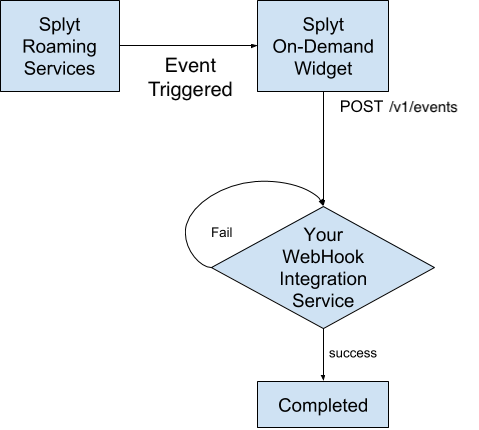
Example payload
{
  "data": {
    "booking_id": "1234567890abcd1234567890",
    "departure_date": "2017-06-05T10:05:00.000Z",
    "driver": {
      "first_name": "John",
      "vehicle": {
        "colour": "white",
        "licence_plate": "ABC1234",
        "make": "Toyota",
        "model": "Yaris"
      }
    },
    "journey_type": "personal",
    "partner_booking_id": "booking-id-1",
    "payment_method": {
      "brand": "Visa",
      "id": "0987654321abcd1234567890",
      "last_four_digits": "6789"
    },
    "receipt": {
      "amount": 1250,
      "currency_code": "USD",
      "fare_refund_amount": 500,
      "id": "1234567890abcd0987654321",
      "last_update_date": "2017-06-05T10:10:00.000Z",
      "outstanding": 1000,
      "sales_tax": 10,
      "sales_tax_refund_amount": 125,
      "splyt_markup": 100,
      "subtotal": 1250
    },
    "status": "arrived",
    "stops": [
      {
        "address": {
          "city": "London",
          "country": "UK",
          "name": "Indirex, Saxon House, 48 Southwark St",
          "postal_code": "SE1 1UN"
        },
        "latitude": 51.504894,
        "longitude": -0.094484,
        "timestamp": "2017-06-05T10:05:00.000Z"
      },
      {
        "address": {
          "city": "London",
          "country": "UK",
          "postal_code": "W2 4EE",
          "street_name": "Pembridge Gardens",
          "street_number": "1"
        },
        "latitude": 51.509475,
        "longitude": -0.196415
      }
    ],
    "user_id": "user123"
  },
  "event": {
    "name": "booking.status.updated",
    "time": "2017-06-05T10:10:00.000Z"
  }
}
Where:
| Key | Type | Description |
|---|---|---|
| data | object | |
| data.booking_id | string (optional) | Field containing the ID of the booking which triggered the event, generated by Splyt Widget. |
| data.departure_date | string | Departure date of the booking in ISO-8601 format. |
| data.driver | object (optional) | This property will never be present when event.name: "booking.created", but will be present otherwise. |
| data.driver.first_name | string | The driver's first name. |
| data.driver.vehicle | object | |
| data.driver.vehicle.colour | string (optional) | The vehicle's colour. |
| data.driver.vehicle.licence_plate | string | The vehicle's licence plate. |
| data.driver.vehicle.make | string | The vehicle's make. |
| data.driver.vehicle.model | string | The vehicle's model. |
| data.journey_type | string | Field that marks the booking as either a personal or business journey. Can contain one of the following values: ["business", "personal"]
|
| data.partner_booking_id | string (optional) | Field containing the ID of the booking which triggered the event, generated by you. This field is only present if you've provided an ID on booking creation. |
| data.payment_method | object | |
| data.payment_method.brand | string | The brand of the payment method. Can contain one of the following values: []. |
| data.payment_method.id | string | The ID of the payment method. |
| data.payment_method.last_four_digits | string | The last four digits of the payment method. |
| data.receipt | object (optional) | This property will only be present for the first time when event.name: "booking.receipt.created", and in every event thereafter. |
| data.receipt.amount | number | The final amount of the receipt for the journey. |
| data.receipt.currency_code | string | The ISO-4217 code in which the receipt has been settled. |
| data.receipt.fare_refund_amount | number | Marks the refund amount of the fare costs |
| data.receipt.id | string | The ID of the receipt. This is generated by Splyt Widget, for your reference. |
| data.receipt.last_update_date | string | Field that marks the last update date of bookings status transition, in ISO-8601 format. |
| data.receipt.outstanding | number | If there has been an issue collecting all or part of the final amount, the amount that is still due is specified in this field. |
| data.receipt.sales_tax | number | TBC. |
| data.receipt.sales_tax_refund_amount | number | Marks the refund amount of the sales tax. |
| data.receipt.splyt_markup | number | TBC. |
| data.receipt.subtotal | number | TBC. |
| data.status | string | Field containing the status in which the booking currently is. Can contain one of the following values: ["arrived", "arriving", "canceled", "completed", "confirmed", "driver-not-found", "en-route", "no-show", "on-board", "rejected", "scheduled", "searching-for-driver"]. |
| data.stops | array | This array is composed of at least one stop, relating to the points in the user's journey. |
| data.stops[].address | object | |
| data.stops[].address.city | string | The city where the particular stop is located. |
| data.stops[].address.country | string | The country where the particular stop is located. |
| data.stops[].address.name | string (optional) | A descriptive string that combines all elements of the address. |
| data.stops[].address.postal_code | string (optional) | The postal code relating to the particular stop. |
| data.stops[].address.street_name | string (optional) | The name of the street relating to the particular stop. |
| data.stops[].address.street_number | string (optional) | The name of the street relating to the particular stop. |
| data.stops[].latitude | number | The latitude of the particular stop. |
| data.stops[].longitude | number | The longitude of the particular stop. |
| data.stops[].timestamp | string (optional) | Time of the stop in ISO-8601 format. |
| data.user_id | string | Field containing the ID of the user to whom this booking is for. This ID is generated by you. |
| event | object | |
| event.name | string | The name of the event. Can be one of the following: ["booking.created", "booking.status.updated", "booking.vehicle.reassigned", "booking.receipt.created", "booking.receipt.updated", "booking.chat.message.created"]. |
| event.time | string | Event time in ISO-8601 format. |
Event Specifications and Life Cycle:
booking.createdThis is the very first event for a booking. It occurs only once and is emitted whenever the user successfully creates a new booking request via Splyt Widget's user interface.
booking.status.updatedThis event is emitted whenever a booking status transition occurs (ie. driver assigned, driver arrives at the pickup point, etc.). It will typically be the second event you will receive (since all others require a driver to be assigned or the booking to be in a terminal status), but can occur at any point thereafter, up until the status is a terminal one (such as
completedorcanceled).
booking.vehicle.reassignedThis event occurs only when the provider re-assigns a different driver to a booking which already had a driver assigned. This can only occur if the status of the booking is
en-route,arrivingorarrived, and will never again occur if the booking has transitioned to anon-boardor terminal status.
booking.chat.message.createdThis event occurs when a new message is posted to the Chat API, either by the driver or the passenger. It will only occur after a driver is assigned to the booking, and before the passenger has boarded the vehicle (i.e. the status of the booking will be
en-route,arrivingorarrived).
booking.receipt.createdThis event occurs only once, when a fare receipt is available for the booking. This will only ever occur after the booking has transitioned to a terminal status.
booking.receipt.updatedThis event will always only occur after a
booking.receipt.createdevent. It may occur multiple times, and will be triggered when either the provider or Splyt's Customer Support team need to amend the fare of the journey (e.g. due to a refund or charge correction).
Response Codes:
| StatusCode | Meaning | Widget Behaviour |
|---|---|---|
| 2XX | Successful request | None. |
| 4XX | Invalid request | Will be retried on a sliding timescale |
| 5XX | Something went wrong | Will be retried on a sliding timescale |
3.15. Notifications
It is common for a user to create a booking, and then leave the widget or your app. The best way to
keep your user informed about their booking is via push notifications. When the
booking changes status, or other booking events occur, widget will call POST /v1/notifications on your CWIS.
If you wish to offer this, it will be your responsibility to manage user permission, and sending the notification itself. The message and title are fully formed, and translated into your user's locale. During
your on-boarding, you can review and edit the text and translations that are used for these notifications.
When a request is sent to this endpoint, it is your responsibility to send the notification itself.
We expect the notification to use the title and message we send as the content of the notification. The deeplink should be sent with the notification. The intention is that when the notification is clicked, you should open WidgetSDK, and pass the deeplink via RideParameters.

Example payload
{
  "deeplink": "on-demand/journeys/aaa000",
  "event": "booking.created",
  "language": "en",
  "message": "This is a message to the user.",
  "splyt_booking_id": "aaa000",
  "title": "Notification Title"
}
Where:
| Key | Type | Description |
|---|---|---|
| deeplink | string | A url that can be passed into Widget via RideParameters, it will direct widget to the booking associated to the notification. |
| event | string | The name of the event, when the notification is associated with one of the referenced Events. Can be one of the following: ["booking.created", "booking.status.updated", "booking.vehicle.reassigned", "booking.receipt.created", "booking.receipt.updated", "booking.chat.message.created"]. |
| language | string | The ISO_639-1 code for the language in which message and title are written in. This is an optional parameter. |
| message | string | The payload of the notification. |
| splyt_booking_id | string | The identifier of a booking, generated on Splyt's side. |
| title | string | The title of the notification. |
Response Codes:
| StatusCode | Meaning | Widget Behaviour |
|---|---|---|
| 2XX | Successful request | None. |
| 4XX | Invalid request | Will be retried on a sliding timescale |
| 5XX | Something went wrong | Will be retried on a sliding timescale |
4. Appendix
4.1 Reason Codes
| Reason Code | Description |
|---|---|
| authorising | System is processing an authorisation request. |
| cancelling | System is processing a cancel request. |
| capturing | System is processing a capture request. |
| charging | System is processing a charge request. |
| exceed_transaction_amount | Refund amount exceeds payment amount. |
| insufficient_balance | User’s balance is insufficient. |
| payment_method_not_found | Payment Method is not found. |
| refunding | System is processing a refund request. |
| transaction_already_exist | The current operation against this partner_transaction_id already exists. |
| transaction_not_found | Transaction is not found. |
| unsupported_currency | The supplied currency_code does not match the list of supported currencies. |
| user_not_found | User is not found. |